
To clean a PS5 without opening it, use a soft microfiber cloth and gently wipe the console’s exterior surfaces. A non-abrasive cleaning solution can be used if needed.
Cleaning your PS5 is essential to keep it running smoothly and looking its best. However, many people are hesitant to open up the console for fear of damaging it. The good news is that you can effectively clean your PS5 without having to open it up.
We will provide you with easy and safe methods to clean your PS5 exteriors using common household items. By following these steps, you can maintain the cleanliness and longevity of your PS5 without any hassle. So, let’s dive in and learn how to clean your PS5 without opening it up.
Gather The Necessary Cleaning Supplies
To properly clean your PS5 without having to open it up, you’ll need a few essential cleaning supplies. These items will help you effectively remove dust and dirt from the console’s exterior surfaces and vents. Here’s what you’ll need:
- Soft microfiber cloth: A gentle and lint-free cloth is perfect for wiping away smudges and dust from the PS5’s glossy surfaces.
- Compressed air can: This tool is ideal for blowing away dust particles from hard-to-reach areas, such as the vents and ports of the console.
- Isopropyl alcohol solution (70% or higher): Use this solution with a microfiber cloth to clean stubborn stains and grime on the PS5’s exterior. Make sure to apply it sparingly to avoid any damage.
- Cotton swabs: These small, narrow-tipped cleaning tools are great for reaching tight spots and details, such as the small crevices around buttons and ports.
- Toothbrush (with soft bristles): A soft-bristle toothbrush can be useful for dislodging dirt and dust from textured surfaces like the PS5’s cooling vents.
- Electronics-safe cleaning wipes: Look for wipes specifically designed for electronics to ensure they won’t damage or leave residue on your PS5.
- Optional: Dust covers or air filters for prevention: If you want to minimize future dust accumulation, consider using dust covers or air filters designed for the PS5. These accessories can help keep your console clean for longer periods.
Remember, when using any cleaning supplies, it’s essential to handle them with care and follow the manufacturer’s instructions. With these items in hand, you’re ready to start cleaning your PS5 without the need to open it up.
Preparing The PS5 For Cleaning
When it comes to cleaning your PS5, it’s important to start by preparing the console before getting into the actual cleaning process. This ensures that the cleaning is efficient and does not cause any damage. Follow these steps to properly prepare your PS5 for cleaning:
Turn Off And Unplug The PS5 Console
- Gently power off the PS5 console using the power button.
- Once the console is powered off, unplug it from the power source. This will eliminate any risk of electric shock while cleaning.
Remove Any External Accessories And Cables
- Disconnect all external cables, including HDMI, USB, and power cords.
- Take off any accessories attached to the console, such as controllers or charging stations.
- Place the removed accessories and cables in a safe location to prevent damage or misplacement.
Ensure The PS5 Is Positioned In A Well-Ventilated Area
- Choose a well-ventilated area that allows for proper air circulation during the cleaning process.
- Avoid cleaning your PS5 in confined spaces or areas with poor airflow, as this can lead to overheating or accumulation of dust and debris.
Use A Can Of Compressed Air To Blow Away Loose Dust And Debris
- Grab a can of compressed air specifically designed for electronics cleaning.
- Holding the can in an upright position, carefully direct the nozzle towards the PS5 console.
- Blow the compressed air into the crevices and ventilation areas to dislodge any loose dust and debris.
- Ensure that you cover all areas, including the front, back, sides, and bottom of the console.
- Be gentle and avoid using excessive force to prevent any potential damage.
By following these steps, you can effectively prepare your PS5 console for cleaning. Once the console is properly prepared, you’re ready to move on to the actual cleaning process. But before doing so, ensure that the console is completely dry and free of any moisture to prevent any electrical issues.
Cleaning The PS5 Exterior
When it comes to cleaning your PS5 without opening it up, there are a few key steps you can take to keep the exterior surfaces looking spotless. Follow these guidelines to ensure a safe and effective cleaning process:
Gently Wipe The Exterior Surfaces With A Soft Microfiber Cloth
- Start by using a soft microfiber cloth to gently wipe away any dust or smudges on the PS5’s exterior.
- Make sure to cover all surfaces, including the top, sides, and back of the console.
- Avoid using any harsh chemicals or abrasive materials that could damage the surface.
Dampen A Cloth With Isopropyl Alcohol Solution To Clean Stubborn Stains
- For stubborn stains or marks that can’t be easily wiped away, dampen a cloth with an isopropyl alcohol solution.
- Isopropyl alcohol is a safe and effective cleaner for electronics, as it evaporates quickly without leaving residue.
- Lightly dab the stained area with the cloth, being careful not to apply too much pressure.
Use Cotton Swabs Dipped In The Alcohol Solution For Hard-To-Reach Areas
- For those hard-to-reach areas, such as the crevices between buttons or around the ports, use cotton swabs dipped in the alcohol solution.
- Gently clean these areas, ensuring that you don’t apply excessive moisture that could seep into the console.
Avoid Excessive Moisture And Use Electronics-Safe Wipes For Sensitive Areas
- It’s essential to avoid excessive moisture when cleaning your PS5 to prevent any potential damage.
- If you need to clean sensitive areas like the vents or the optical drive, use electronics-safe wipes specifically designed for electronics cleaning.
- These wipes are typically formulated to be gentle on electronics while effectively removing dirt and grime.
Remember, maintaining a clean PS5 exterior not only keeps your console looking its best but also helps prevent dust and debris from affecting its performance. By following these simple cleaning steps, you can ensure a clean and well-maintained PS5 without the need to open it up.
Now you have all the information you need to keep your PS5 looking its best. Happy cleaning!
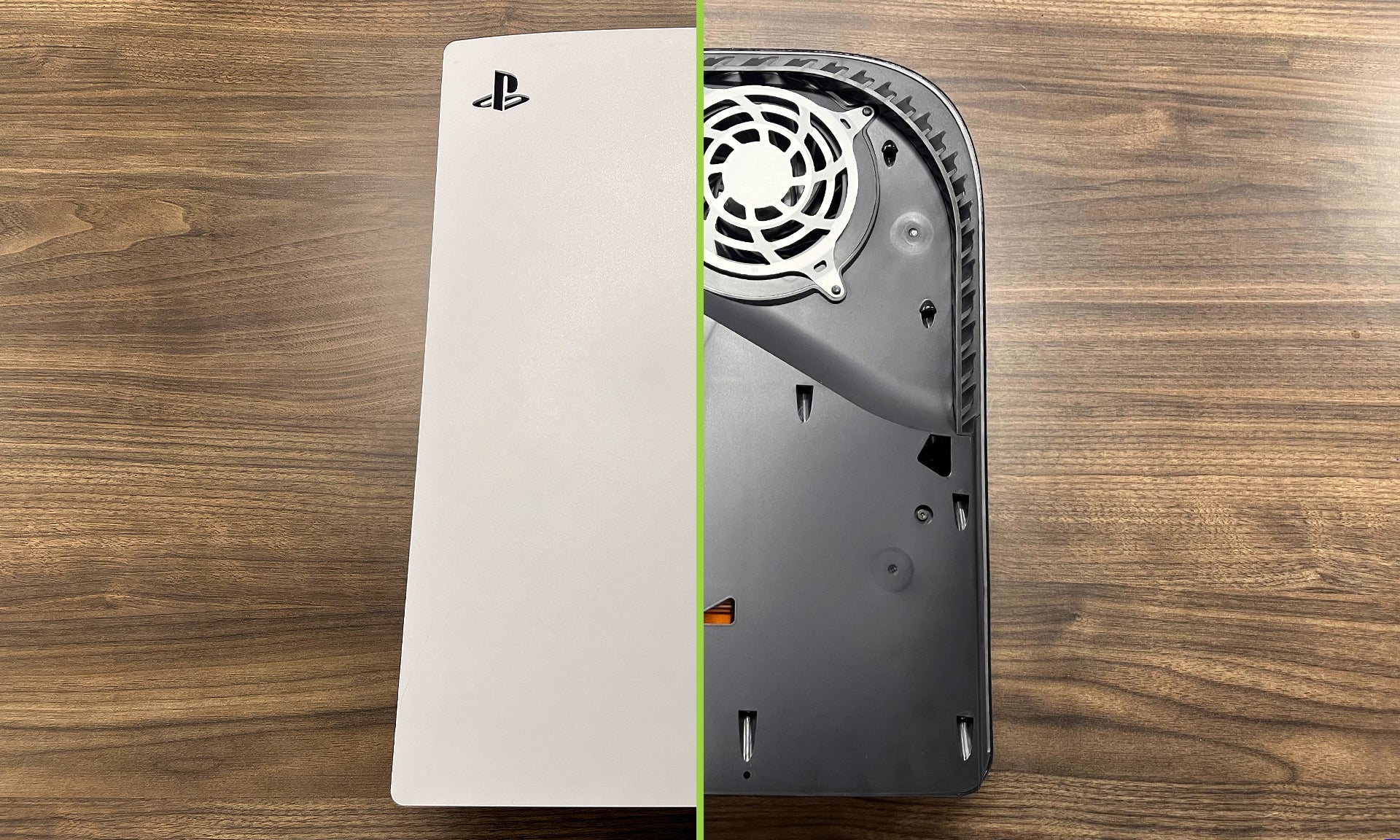
Credit: hideitmounts.com
Cleaning The PS5 Ventilation Holes
Dust accumulation in the ventilation holes of your PS5 can impede proper airflow and potentially lead to overheating. Cleaning these ventilation holes is an essential maintenance task that can be performed without opening the console. Here’s a step-by-step guide on how to do it:
Turn Off The PS5 And Unplug It From The Power Source
Before starting the cleaning process, it’s crucial to turn off the PS5 and disconnect it from the power source. This ensures your safety and prevents any accidental damage to the console.
- Power off your PS5 by pressing and holding the power button on the front until it beeps and the power indicator light turns off.
- Once powered off, unplug the console from the electrical outlet or power strip to eliminate any risk of electric shock.
Use A Can Of Compressed Air To Remove Dust From The Ventilation Holes
To clean the ventilation holes effectively, you’ll need a can of compressed air. Follow these steps to ensure optimal cleaning:
- Shake the can of compressed air gently to avoid any potential liquid from escaping during usage.
- Holding the can upright, position the nozzle a few inches away from the ventilation holes.
- Use short bursts of air to blow out the dust, ensuring no liquid escapes from the can.
Remember, maintaining a constant distance and using short bursts of air prevents any liquid from damaging the console.
Proper cleaning of the PS5 ventilation holes reduces the risk of overheating and ensures optimal performance. By following these simple steps, you can easily keep your console free from dust and extend its lifespan. Regularly cleaning the ventilation holes will help preserve its functionality and prevent potential issues.
Cleaning The PS5 Disc Drive
To ensure your PS5 is running smoothly, it’s important to keep the disc drive clean. Here are some steps to clean the PS5 disc drive without opening it:
- Carefully insert a cotton swab soaked in isopropyl alcohol into the disc drive: Isopropyl alcohol is a gentle yet effective cleaning agent. Moisten a cotton swab with it and insert it into the disc drive, being careful not to apply too much pressure.
- Gently clean the inner mechanism and lens with the cotton swab: With the isopropyl alcohol-soaked cotton swab, gently clean the inner mechanism and lens of the disc drive. Make sure you reach all corners and crevices to remove any dirt or dust that may have accumulated.
- Use a toothbrush with soft bristles to remove any stubborn debris: For stubborn debris that may be harder to reach with a cotton swab, use a toothbrush with soft bristles. Gently brush the inner mechanism and lens, being cautious not to cause any damage.
- Let the disc drive dry completely before using it again: After cleaning the disc drive, give it some time to dry completely. This will prevent any moisture from causing damage when you use it again.
Remember to follow these steps carefully to avoid any damage to your PS5 disc drive. Regularly cleaning your PS5 will help prolong its lifespan and ensure optimal performance.
Cleaning The PS5 Controllers
Keep your PS5 controllers clean without opening them up. Follow these simple steps for a hassle-free cleaning process that will keep your consoles in top shape.
Disconnect the controllers from the PS5 console:
- Carefully unplug the controllers from the PS5 console to ensure safe and efficient cleaning.
- Avoid using excessive force or pulling on the cables to prevent damage.
Wipe the controllers with a soft microfiber cloth:
- Take a soft microfiber cloth and gently wipe the surface of the controllers to remove any dust or dirt.
- Ensure that the cloth is clean and free from any debris that could scratch the surface of the controllers.
Use cotton swabs dipped in isopropyl alcohol for hard-to-reach areas:
- Dip a cotton swab into isopropyl alcohol, ensuring not to saturate it excessively.
- Gently clean the hard-to-reach areas of the controllers, such as the crevices between buttons and around the thumbsticks.
- The alcohol helps to effectively remove any stubborn grime or residue.
Let the controllers dry completely before reconnecting them:
- After cleaning, allow the controllers to air dry completely before reconnecting them to the PS5 console.
- This ensures that no moisture remains on the controllers, which could potentially damage the internal components.
- Ensure that the controllers are completely dry by visually inspecting them before reconnecting.
Remember to follow these steps to keep your PS5 controllers clean and in optimal condition. By disconnecting the controllers, wiping them with a soft cloth, using isopropyl alcohol for hard-to-reach areas, and allowing them to dry completely, you can ensure a thorough cleaning without the need to open up your PS5.
Enjoy your gaming sessions with clean and well-maintained controllers!
Maintaining A Clean PS5
Maintain your PS5’s cleanliness without opening it by following simple yet effective cleaning methods. Keep your console dust-free and ensure optimal performance without the need for complicated disassembly procedures.
Regularly dust the PS5 console with a soft microfiber cloth:
- Gently wipe the exterior of the PS5 console using a soft microfiber cloth to remove any dust or loose particles.
- Pay special attention to the ventilation areas, ports, and any other crevices where dust might accumulate.
- Avoid using rough materials or abrasive cleaners that could scratch the surface of the console.
Keep the PS5 in a clean and well-ventilated area:
- Choose a dedicated area for your PS5 console that is free from excessive dust or dirt.
- Avoid placing the console on the floor or near high-traffic areas where it can easily collect dust.
- Ensure that the area around the console is well-ventilated to prevent overheating.
Consider using dust covers or air filters for long-term prevention:
- Invest in a dust cover specially designed for the PS5 to protect it from dust and debris when not in use.
- Air filters can be attached to the ventilation areas to minimize the amount of dust that enters the console.
- These preventive measures can help reduce the need for frequent cleaning and prolong the life of your PS5.
Avoid eating or drinking near the PS5 to minimize potential spills:
- Accidents happen, and spills can cause significant damage to your PS5 console.
- To prevent liquid spills, it’s best to keep food and drinks away from the console.
- If you do need to have a snack or beverage while gaming, use spill-proof containers and be extra cautious.
Remember, a clean PS5 not only enhances its appearance but also maintains its performance and longevity. By following these simple steps, you can ensure that your PS5 stays dust-free and functions smoothly for years to come. Keep your gaming experience fresh and enjoyable!
Frequently Asked Questions On How To Clean PS5 Without Opening
How Do I Clean My PS5 Controller Without Opening It?
To clean your PS5 controller without opening it, use a microfiber cloth with isopropyl alcohol.
What Is The Easiest Way To Clean A PS5?
To clean a PS5 easily, use a microfiber cloth to wipe the console gently. Avoid using water or harsh chemicals.
Is There A Way To Clean Inside Of Your PS5?
Yes, you can clean the inside of your PS5 by using compressed air and a soft brush.
How Do I Get All The Dust Out Of My PS5?
To get rid of dust in your PS5, gently wipe the exterior with a soft cloth.
Conclusion
Cleaning your PS5 without opening it is a simple and effective way to maintain its performance and extend its lifespan. By following the proper techniques and using the right tools, you can remove dust and debris that accumulate over time.
Start by turning off and unplugging the system, then gently wipe the exterior using a microfiber cloth. Pay attention to the vents and ports, ensuring they are free from obstructions. For the interior, use a can of compressed air to blow away any dust particles.
Be careful not to get too close to the components to avoid damage. Regularly cleaning your PS5 without opening it can prevent overheating and improve airflow, resulting in smoother gameplay and fewer technical issues. With these maintenance tips, you can keep your PS5 in top shape and enjoy an optimal gaming experience for years to come.
As an Amazon Associate, Cleanestor earns from qualifying purchases at no additional cost to you.